Requirement questions
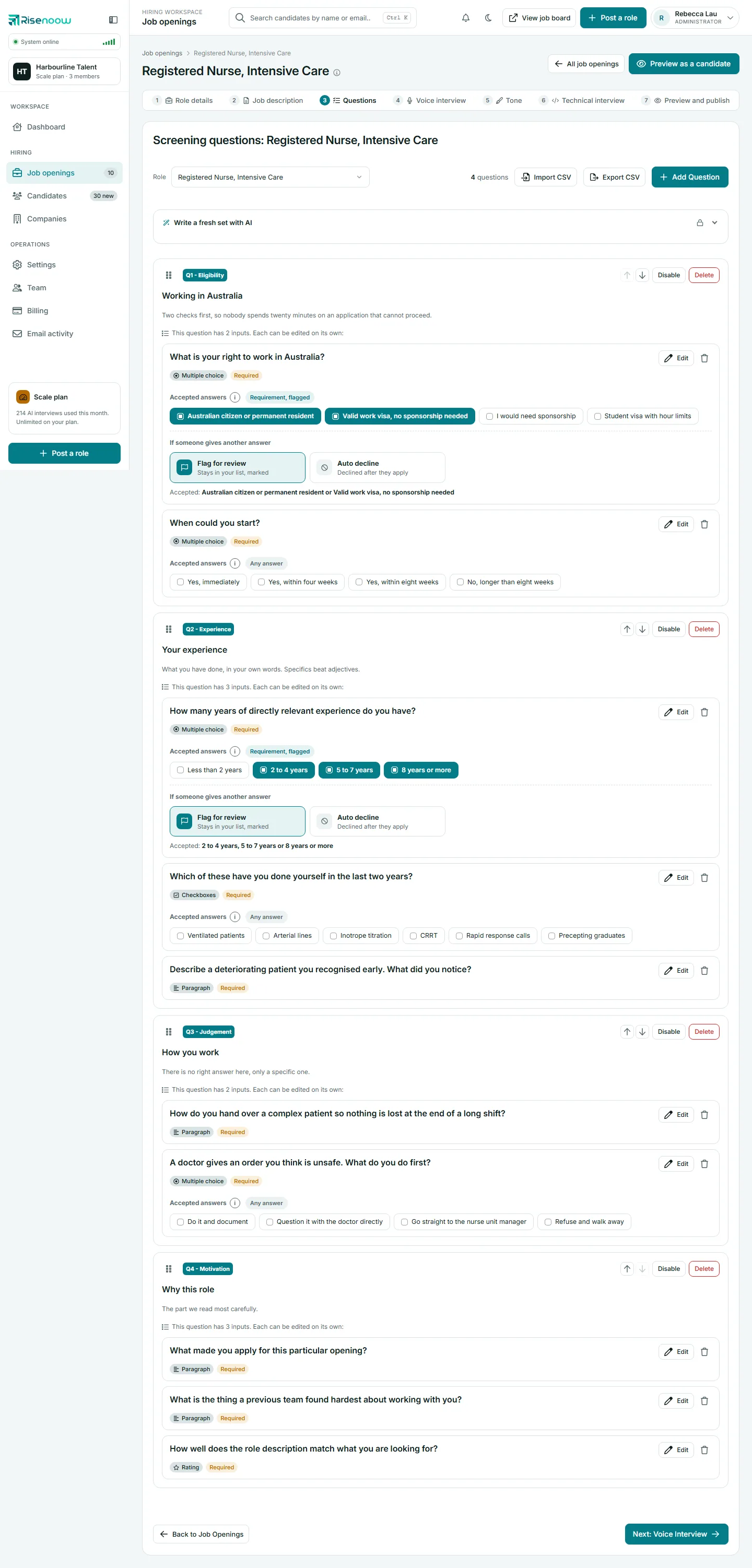
A requirement question in Risenoow is an ordinary choice question with the answers you accept ticked. Anyone who gives another answer is either flagged for your review or declined automatically after they apply. Use requirements for true must haves, such as the right to work or a licence, so you spend your time on people who can take the job.
Where: Job openings, Edit on a role, the Questions tab, under Accepted answers on a question
Who can use it: Admins and recruiters (recruiters on their own roles)
Time needed: Under a minute per question
Which questions can carry a requirement
Only Multiple choice, Checkboxes and Yes / No questions, because their answers come from a list you wrote. Text, paragraph and rating questions cannot. A requirement is never read from a CV; it is always asked.
Set a requirement
- On the question card, find Accepted answers. The label beside it reads Any answer while nothing is ticked.
- Tick every answer that meets your requirement. A requirement usually spans several answers: wanting three years or more means ticking every band from three years up, not just one.
- On a Checkboxes question, choose under Needs: any one of the ticked answers or all of the ticked answers.
- Under If someone gives another answer, choose Flag for review or Auto decline.
- Check the summary line, which reads Accepted: followed by your ticked answers.
Changes save as you make them. The bottom of the list shows Saving... and then All changes saved. Untick every answer and the question becomes an ordinary question again.
Flag for review or Auto decline
| Choice | On the card | What happens |
|---|---|---|
| Flag for review | Stays in your list, marked | The candidate applies as normal. You see their application marked as not meeting this requirement, and you decide |
| Auto decline | Declined after they apply | The candidate applies as normal and is told nothing at the time. Once they submit, the application is declined and they are emailed the reason |
The label beside Accepted answers shows your choice: Requirement, flagged or Requirement, auto decline.
Auto decline needs an accepted answer
If you choose Auto decline but tick no accepted answer, no requirement is saved and every application gets through. The page warns you: tick the answers that meet your requirement, then choose what happens.
AI written requirements start as Flag
When the AI writes your questions, any accepted answers it suggests are set to Flag for review, so nobody is declined without you choosing it. Switch any of them to Auto decline yourself.
What the candidate sees
Questions with a requirement are asked first, before the voice interview. The candidate's progress bar shows a Role requirements step marked Asked first, and the counter reads Requirement questions.

What the candidate does not see:
- Which answers you accept.
- Whether a question is flagged or set to decline.
- Any sign, while applying, that an answer did not meet a requirement.
This is deliberate. A rule that shows itself teaches people which answer to change. If an answer will lead to a decline, the voice interview is skipped and the candidate carries on with the written questions, so the application never costs an interview or an AI report.
The decline email explains the kind of requirement politely, for example that the role needs the right to work where it is based. It does not quote your question, your accepted answers or their answer.
What you see
Each candidate's record has a Requirements tab listing every requirement, what they answered, the accepted answers and whether it was met.

Frequently asked questions
What if I add a requirement after people have applied?
Earlier applicants were never asked it, so it is recorded as not answered and does not count against them.
Does a disabled question still filter candidates?
No. Only switched on questions are asked, so only their requirements apply.
Can a candidate change an answer to get through?
They are never told which answers you accept or that a requirement exists, so there is nothing to work around.
Are requirements kept when I duplicate a role?
Yes. A copy keeps each question's accepted answers and its Flag for review or Auto decline setting.
Should I use Auto decline?
Use it only for true must haves you cannot work around, such as a legal right to work. For anything you might bend for the right person, use Flag for review.