Career profile
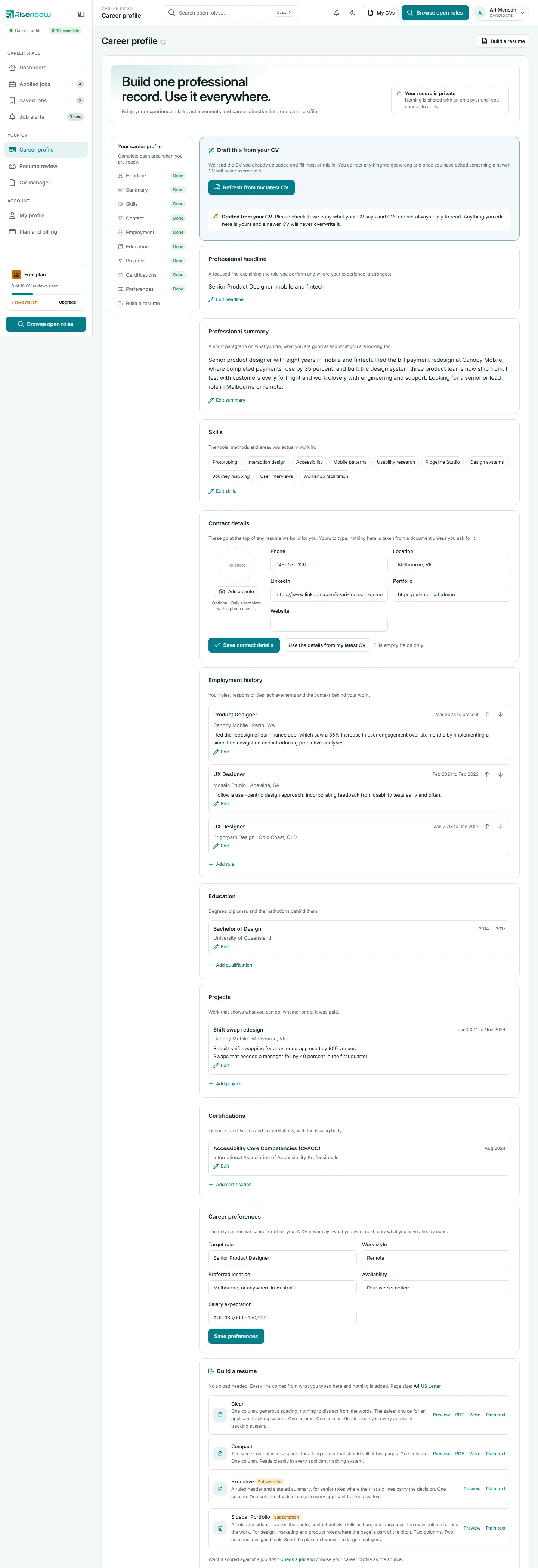
Your career profile in the Risenoow candidate portal is one clear record of your experience, skills and career direction. It is drafted from your CV, you correct and complete it, and it then feeds your applications, the resumes you build and the roles matched to you on your dashboard.
Where: Career profile in the left menu
Who can use it: Every job seeker account
Time needed: 10 to 20 minutes the first time
Your record is private
No employer can browse or search your career profile. Employers see it only when you apply to one of their roles, as a copy taken on the day you applied.
Draft it from your CV
If you have uploaded a CV, or applied for a role with one attached, the portal can fill in most of the page for you.
- Open Career profile in the left menu.
- In Draft this from your CV, select Draft my profile from my CV. Once drafted, the button reads Refresh from my latest CV.
- Wait while it reads your CV. This can take up to a minute.
- Check every section. CVs are not always easy to read, so dates and titles can come out wrong.
The CV used is your default in the CV manager. No CV yet? Select Upload a CV, or fill in any section by hand.
Your edits are safe
Anything you edit is yours. A newer CV will never overwrite it. If a newer CV says something different, the section shows Your newer CV says something different with two buttons: Use this or Keep mine.
The sections
| Section | What goes in it |
|---|---|
| Professional headline | One focused line on the role you perform and where you are strongest |
| Professional summary | A short paragraph: what you do, what you are good at, what you want. Three or four sentences is plenty |
| Skills | Tools, methods and areas you work in. One per line, or separated by commas |
| Contact details | Phone, Location, LinkedIn, Portfolio, Website, and an optional photo |
| Employment history | Your roles, with title, organisation, location, dates and a description |
| Education | Degrees, diplomas and where you studied |
| Projects | Work that shows what you can do, paid or not |
| Certifications | Licences, certificates and accreditations, with the issuing body |
| Career preferences | Target role, Work style, Preferred location, Availability and Salary expectation |
Edit a section
- Select the section in the list on the left to jump to it.
- Select Edit or Add under the section (for example Edit headline, Add role, Add qualification).
- Make your change and select the save button, such as Save headline or Save.
For employment, education, projects and certifications, each entry needs at least a title or an organisation. Tick This is current for a role you still hold. Use the up and down arrows to reorder entries, and Remove inside Edit to delete one.
Contact details and photo
Contact details go at the top of any resume you build. They are only ever what you type. Use the details from my latest CV fills the empty fields from your CV and leaves the rest alone. Select Save contact details when done.
Add a photo takes a JPEG or PNG under 5 MB. It is optional, and only a resume template with a photo uses it.
Career preferences
Your CV never says what you want next, so this is the one section the portal cannot draft. Fill it in and select Save preferences. Your Target role and skills drive Roles that fit you on your dashboard.
Build a resume from your profile
Once your profile has your name and at least one job or qualification, the Build a resume section opens. No upload is needed: every line comes from what you typed, and nothing is added.
- Choose a page size: A4 or US Letter.
- Pick a template and select Preview, PDF, Word or Plain text.
Templates marked Subscription offer Preview and Plain text only. The preview carries a PREVIEW watermark. See CV manager for more on templates and formats.
To score your profile against a job first, select Check a job and choose My career profile as the source. See Resume review.
Download or delete your profile
In Export or delete this profile:
- Download my profile saves a copy of your profile as a data file.
- Delete my profile removes the profile and everything in it, after you confirm. Applications you have already sent keep the copy captured on the day you applied, because that is the employer's record of an application you chose to send.
Frequently asked questions
Do employers see my career profile?
Only when you apply. The employer receives a copy of your profile as it was on the day you applied. Nobody can browse or search it.
Why did the draft get my dates wrong?
The draft copies what your CV says, and some CV layouts are hard to read. Correct the entry and save. Your edit will not be overwritten.
What does the percentage next to Career profile mean?
The pill above the left menu shows how many of seven parts are filled in: headline, summary, skills, experience, contact details, career preferences and portfolio links.
Can I build a resume without uploading a CV?
Yes. Fill in your profile by hand, then use Build a resume.