Shortlisted card
The Shortlisted card on the Risenoow dashboard counts the candidates you have put on your shortlist, shows what share of all applicants that is, and tells you how many candidates you have invited to a technical interview.
Where: Dashboard, fifth card in the row of six numbers
Who can use it: Workspace admins and recruiters
Time needed: A glance
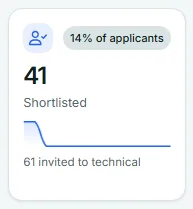
What the number counts
The big number is every candidate at the Shortlisted stage today, across the roles you can see. If you move a shortlisted candidate to another stage, they leave this count.
A recruiter's card counts only the roles they created.
The pill: share of applicants
The pill reads 14% of applicants. It is the shortlisted count divided by every application at every stage, rounded to a whole number. It is grey, because the right share depends on the role.
A very high share can mean the screening questions are too easy to pass. A very low share, with many candidates still waiting, usually means decisions are behind rather than that the field is weak. Check the Application pipeline chart to tell the two apart.
The trend line
The line covers the last 14 days. For each day it shows how many applications that arrived on that day are shortlisted today. A point rises when you shortlist someone who applied on that day. Point at the line to see the date and count, for example "Oct 9: 2 shortlisted".
The footer line
The footer reads N invited to technical: how many candidates have been invited to a technical interview, counting each candidate once and leaving out cancelled invitations. Every other invitation counts, whether it is waiting to be booked, booked, finished or missed.
This number can be higher than the shortlist. A candidate invited to a technical interview and later moved to another stage still counts in the footer, but not in the big number.
When you pick one role
Choose a role in Role scope and the number, pill, line and footer show that role only. The pill then compares the role's shortlist with the role's own applicants.

What to do about it
- Shortlisted candidates not yet invited. If the footer is lower than the big number, some shortlisted candidates have no technical interview yet. Open their record and use the invitation, see Invite to a technical interview.
- The shortlist is not moving. Start from Top candidates to decide on. It lists the highest scores you have not decided on, each with a Shortlist button.
Good to know
When you shortlist a candidate, Risenoow emails them to say their application has moved forward. Shortlist when you mean it.
Frequently asked questions
Does the percentage include declined candidates?
Yes. It divides by every application, whatever its stage, so declined candidates are part of the total.
Why is "invited to technical" higher than the shortlist?
The footer counts everyone who was ever invited, apart from cancelled invitations. Some of those candidates may have moved on from the Shortlisted stage since.
Can I shortlist straight from the dashboard?
Yes. Use the Shortlist button in Top candidates to decide on.
Where do I see who is shortlisted?
Open Candidates in the left menu and filter by the Shortlisted stage.