Total applications card
The Total applications card on the Risenoow dashboard shows every application your roles have received, and whether the flow of new ones is speeding up or slowing down. It is the quickest way to tell if your roles are reaching people.
Where: Dashboard, second card in the row of six numbers
Who can use it: Workspace admins and recruiters
Time needed: A glance
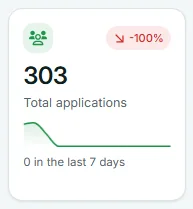
What the number counts
The big number is every application to the roles you can see, at every stage: New, AI reviewed, In review, Shortlisted and Declined. Declined candidates stay in the count, because they did apply.
A recruiter's card counts only applications to the roles they created.
The pill: this week against last week
The pill compares two weeks:
- This week: applications that arrived in the last 7 days, today included.
- Last week: applications in the 7 days before that.
It shows the change as a percentage. A green pill with an arrow pointing up means the same or more than last week. A red pill with an arrow pointing down means fewer.
| Example | What it means |
|---|---|
| +20% green | 10 last week and 12 this week. |
| +0% green | The same as last week, or none in either week. |
| +100% green | Last week had none and this week has some. |
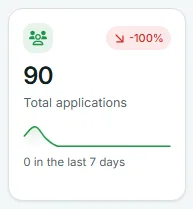
| -100% red | Last week had some and this week has none. |
Read the footer with the pill
A percentage can look dramatic on small numbers. Two applications against one is +100%. The footer gives you the real count.
The trend line
The line under the label shows applications per day for the last 14 days, by the day they arrived in your workspace's time zone. Point at it to see a day and its count, for example "Oct 14: 7 applications".
The footer line
The footer gives the plain count behind the pill: "12 in the last 7 days".
When you pick one role
Choose a role in Role scope and the number, pill, line and footer all describe that role. The pill's colour and arrow change with it, so a red pill means that role had fewer applications this week than last.
What to do about it
- The pill is red two weeks running. Your roles may have dropped out of view. Share the application link again from Job openings, or check that the role is published.
- A role has few applications. Pick it in Role scope to see its line on its own, then compare with the Applications over time chart.
- A sudden jump. Check the Match scores chart. A rise in applications with a fall in scores often means the role is being seen by the wrong audience.
Frequently asked questions
Do deleted candidates count?
No. A deleted application is gone from every count on the dashboard.
Why is the pill green when nothing arrived?
When neither week has any applications the change is zero, which shows as +0% in green.
Is "this week" Monday to Sunday?
No. It is the last 7 days, counted back from today.
Do applications to disabled roles count?
Yes. Disabling a role stops new applications, but the ones it already received stay in the total.