Open roles list
The Open roles list on the Risenoow dashboard shows your roles that are taking applications, the ones with the most applications waiting first. For each role you see its applicants, its shortlist, its closing date, its average match score and how many applications are waiting for review.
Where: Dashboard, near the bottom, on the right
Who can use it: Workspace admins and recruiters
Time needed: Under a minute
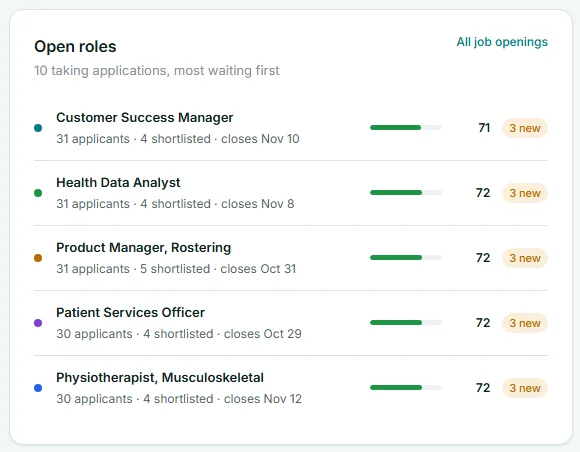
Which roles are listed
The list holds every open role you can see: switched on, published and not past its closing date. It is sorted by the number of applications waiting for review, most first. Waiting means at New or AI reviewed, so no person has acted on them yet. Roles with the same number are sorted by total applicants, most first.
The heading line, for example "10 taking applications, most waiting first", gives the full count. The card shows the first five. When there are more, the foot of the card reads Showing 5 of 10 open roles with a See them all in Job openings link. All job openings at the top right of the card opens the same page.
A recruiter's list holds only the roles they created.
What each row shows
| Part | What it shows | Where it leads |
|---|---|---|
| Coloured dot | Helps tell the rows apart. The colour has no other meaning. | |
| Role name | The role title. | Opens Candidates filtered to this role. |
| Second line | "31 applicants · 4 shortlisted · closes Nov 10". The closing date appears only if the role has one. | |
| Score bar and number | The average match score of the role's scored candidates. Green is 70 or more, amber 50 to 69, red under 50. Not scored when no one is scored yet. | |
| Pill | 3 to review (amber) when applications are waiting at New or AI reviewed, or None to review (grey). | 3 to review opens Candidates filtered to this role. |

When you pick one role
Choose a role in Role scope and the list shows only that role, if it is open. A draft, closed or switched off role shows No open roles in this scope. The heading line describes that role, for example Taking applications or Not published yet.
When you have no roles at all, the list reads No roles yet. Post your first role to start screening.
What to do with it
- Work from the top. The first role has the most applications waiting. Select its N to review pill to go straight to them.
- A low score bar. The role is attracting candidates who do not match. Check the job description and where the link is shared.
- A role closing soon with few applicants. Share it again, or move its Closing date later in the role's details. See Details tab.
Good to know
Roles closing within 7 days also appear in Needs your attention, with a Review role button.
Frequently asked questions
Why do I see only five roles when the heading says ten?
The dashboard card shows the five roles with most waiting. Select See them all in Job openings to see every role, including drafts, closed and switched off ones.
Why is a role I recently created not listed?
A role saved part way through Post a role appears once you finish it. A draft that has never been published is not listed either, nor is a role you switched off.
Does a role past its closing date still appear?
No. Once its closing date has passed the role is closed and no longer takes applications, so it leaves the list. Set a later closing date on the role to open it again.
What does the dot colour mean?
Nothing beyond telling rows apart. The colours repeat in order down the list.