Write a job description with AI
Write with AI is the first tab on step 2 of Post a role in Risenoow. The AI drafts a complete job description from your role facts and anything you add in one optional box. It writes the parts that describe the job, and it never invents facts about your company.
Where: Post a role, step 2, tab Write with AI
Who can use it: Workspace admins and recruiters
Time needed: Under a minute to fill in, then a short wait
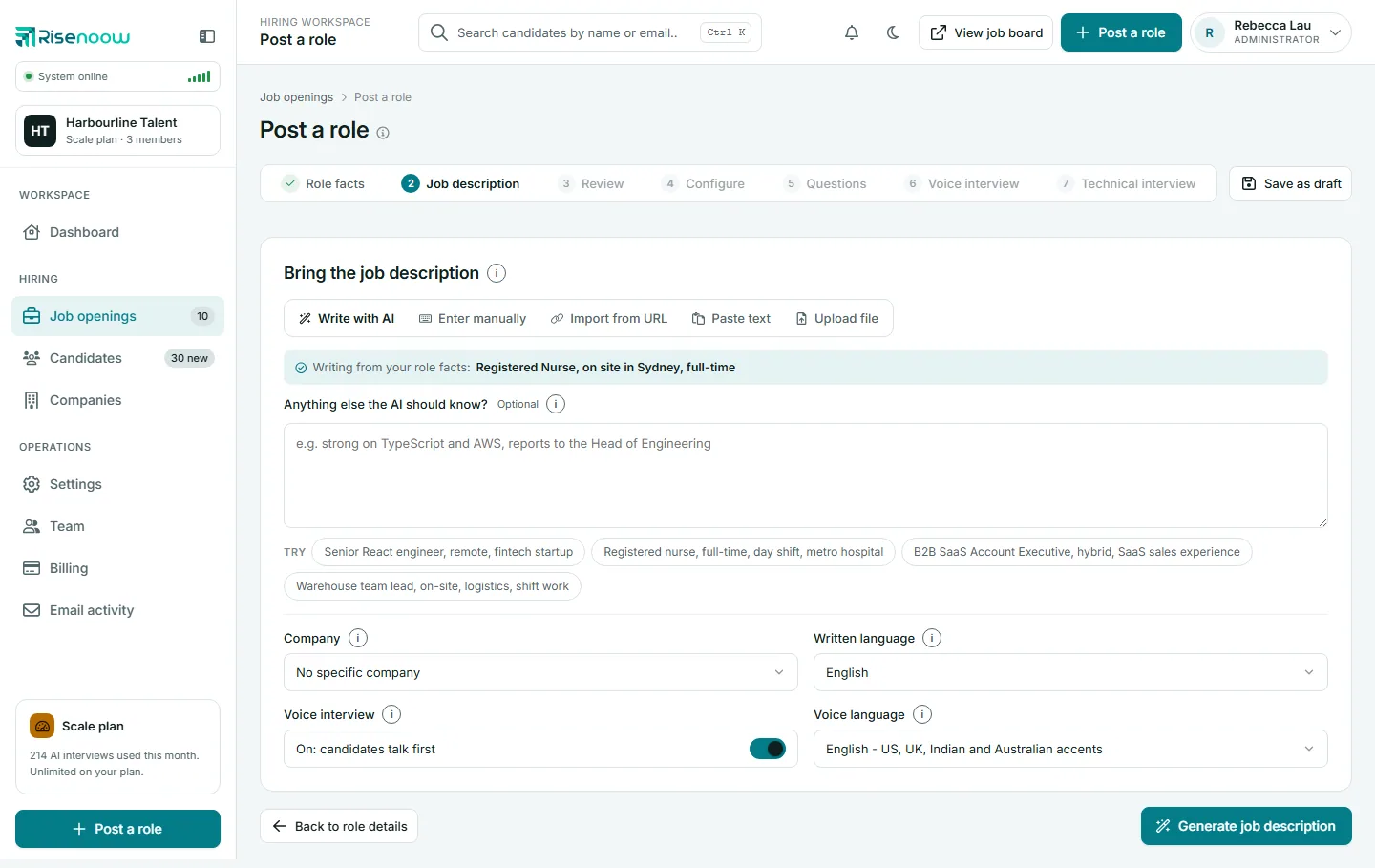
Write the description
- On step 2, select the Write with AI tab.
- Check the line Writing from your role facts. It repeats your title, work arrangement, city and employment type.
- Optional: type anything else the AI should know in the box.
- Choose the Company, Written language and Voice interview settings under the box.
- Select Generate job description.
A loading screen says the AI is writing your job description, which can take up to a couple of minutes. When it is done, the Review step opens with the draft.
The "Anything else the AI should know?" box
The box is optional. Left empty, the AI works from your role facts alone: the title, classification and city.
Use it for what the role facts cannot say. This is the one place to tell the AI about:
- skills and tools, and which are essential or only nice to have
- who the person reports to, and the team they work with
- your products, customers and markets
- benefits you offer
- numbers you want in the success targets
- a question you want candidates asked
The placeholder in the box shows the kind of thing to write: the skills that matter most and who the role reports to.
Your notes reach every stage
What you type here is treated as instructions from the hiring team. It is followed in the description, and also in the written, voice and technical questions written on step 4. If you ask for a question on a topic, the AI asks it.
The example chips
Under the box, the word Try is followed by four examples:
- Senior React engineer, remote, fintech startup
- Registered nurse, full-time, day shift, metro hospital
- B2B SaaS Account Executive, hybrid, SaaS sales experience
- Warehouse team lead, on-site, logistics, shift work
Selecting a chip puts its text in the box, replacing what was there. Edit it before you generate. Where a chip disagrees with your role facts, the role facts win.
What the description contains
The description has a title and these sections, in this order:
- About the Role: what the role owns, who it serves and why a strong candidate would apply.
- Key Responsibilities: 6 to 10 points, each starting with a verb.
- What Success Looks Like: only when you give targets, such as "within 90 days, a design system of 20 components". The AI uses your targets and your numbers. With no targets, this section is left out.
- Requirements: the must haves, with experience given as a number or a scope.
- Nice to Have: preferred extras.
- What We Offer: built only from what you gave.
In another written language, the headings are written in that language too.
What the AI may and may not write
| The AI may | The AI never |
|---|---|
| Describe the work, responsibilities and requirements typical for this role and seniority | Invents a team, colleagues or a reporting line you did not mention |
| Write success targets from the ones you gave | Invents a success target, a number, a benefit, a perk, a growth path or a culture claim |
| Add a closing Tools you will use line naming the usual types of tool, such as "a CRM" or "an electronic medical record system" | Names a tool brand you did not name |
| State your pay in What We Offer, with the pay type | Invents, converts or widens a pay figure |
| Use your company's name and introduction | Turns the company tagline into a responsibility or a benefit |
Tools you named go under Requirements, unless you called them nice to have, preferred or optional. Then they go under Nice to Have. Filler words such as "dynamic" or "fast paced" are removed.
Want success targets in the advert?
Type them in the box, for example "Targets: within 30 days, audit the 3 main products". The AI puts them under What Success Looks Like as you wrote them.
The AI checks its own draft before you see it, and writes it again once if a check fails. See How the AI writes your role.
Frequently asked questions
Do I have to type anything in the box?
No. With the box empty, the AI writes from the role facts. Adding a sentence about tools, team and customers gives a more specific draft.
Why does my description have no benefits?
What We Offer is built only from what you gave: pay, employment type, work arrangement, contract length and any benefit you typed in the box or in the company details. Add your benefits to the box, or use Expand the benefits on the Review step.
Why is there no What Success Looks Like section?
You gave no targets, so the AI left it out rather than make them up. Add your targets to the box and generate again, or use the Review step to ask for them.
What does "(suggested)" mean on an older role?
Roles written before 16 Nov 2026 may show targets marked "(suggested)" in the editor. The AI proposed them. Candidates never see the word. Change or delete those targets before you publish.
Can I write again with different notes?
Yes. Use Regenerate on the Review step for a fresh draft from the same notes, or go back to this step, change the notes and generate again.