Step 6: Check the voice interview
Voice interview is step 6 of Post a role in Risenoow. It shows what the AI interviewer will say: the brief it follows, an optional opening greeting, the questions it asks out loud and a preview of the whole conversation. It is the same screen as the role's Voice interview tab, with the Post a role steps on top.
Where: Post a role, step 6, after Next: voice interview
Who can use it: Workspace admins and recruiters
Time needed: Two to five minutes
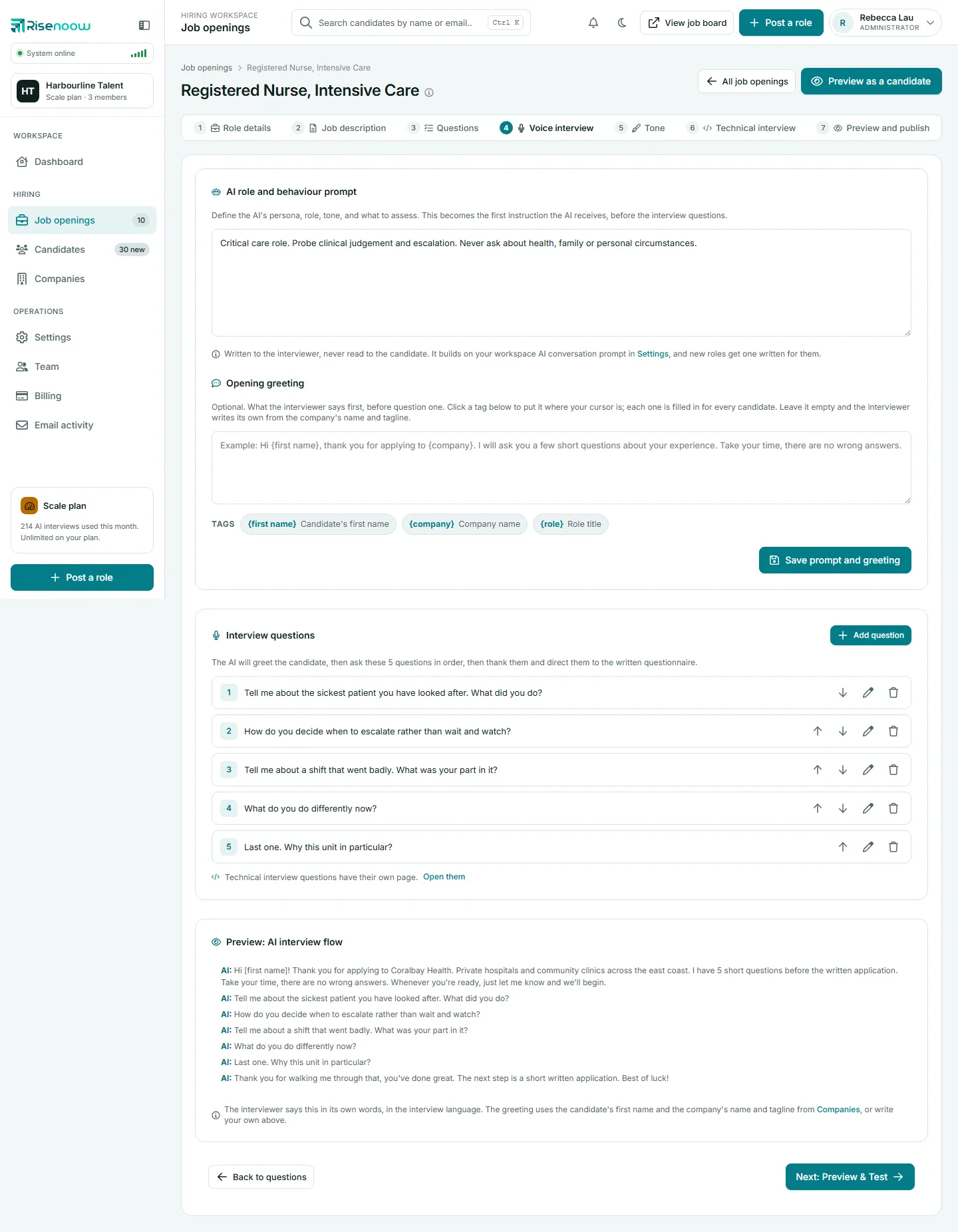
This step only appears when the Voice interview switch was on at step 2. With it off, the step bar goes from Questions straight to Technical interview.
AI role and behaviour prompt
A brief written to the interviewer, never read to the candidate. It sets who the interviewer is, the tone to keep and what to assess. The AI writes one for each new role, and it builds on the workspace prompt in Settings.
If the text reads like a greeting, a warning asks you to rewrite it starting with "You are", because the interviewer greets candidates by itself.
Opening greeting
Optional, up to 500 characters. It is what the interviewer says first, before question one. Leave it empty and the interviewer writes its own from the company's name and tagline.
Select a tag to put it where your cursor is. Each one is filled in for every candidate:
| Tag | Filled in with |
|---|---|
| {first name} | The candidate's first name |
| {company} | The company name |
| {role} | The role title |
Select Save prompt and greeting to keep changes to either box.
Interview questions
The questions the interviewer asks, in order. The AI wrote the number you chose on step 4, in the voice language from step 2. They ask the candidate to show the work aloud, such as handling a situation from the role or walking through a real result, rather than yes or no answers. They do not repeat topics the written or technical questions already cover.
- Read each question aloud. It should sound natural in conversation.
- Use the arrows to change the order.
- Select the pencil to edit a question, or the bin to delete it.
- Select Add question to write your own. The AI asks it word for word.
A question can carry an image, such as a diagram, shown on the candidate's screen while it is asked. PNG or JPG, up to 2 MB.
Preview: AI interview flow
The preview lists the conversation from start to finish: the greeting, each question and the closing line that sends the candidate to the written application. The interviewer says it in its own words, in the interview language.
Move on
Select Next: technical interview to continue, or Back: questions to return to step 5.
Good to know
Candidates take the voice interview before the written questions. Keeping it to three or four focused questions respects their time.
Frequently asked questions
Does the AI read my questions exactly as written?
Questions you add are asked word for word. The greeting and the closing line are said in the interviewer's own words.
Can I change the language of the interview here?
No. The voice language is chosen on step 2, or later on the role's Job description tab.
What if there are no voice questions?
If the AI could not write them, the list is empty. Select Add first question and write them yourself.
Can I turn the voice interview off now?
The switch is on the role's Job description tab. Turning it off means candidates answer the written questions only.